12 WhatsApp Automation Examples That Actually Drive Revenue (2026)
Most businesses still run WhatsApp like a personal chat. One person typing replies. Copy-pasting the same answers. Forgetting to follow up. Meanwhile, their competitors are sending targeted campaigns, qualifying leads automatically, and resolving support tickets at 3 AM without a human in sight.
The difference isn't headcount. It's automation.
This guide walks through 12 specific WhatsApp automations that real businesses use to save hours every week and generate measurable revenue. Each example follows the same structure: the business problem, the automation that solves it, and the outcome you can expect.
No theory. No vague promises. Just practical setups you can build today with WhatsTeam's WhatsApp Business API platform.

What Is WhatsApp Automation?
WhatsApp automation uses the WhatsApp Business API to send messages, respond to customers, and trigger actions without manual intervention. Instead of a person reading every message and typing every reply, software handles the repetitive parts.
This includes:
- Auto-replies that respond instantly when a customer messages you
- AI chatbots that answer questions, qualify leads, and route conversations
- Campaigns that send targeted messages to segmented contact lists
- Template messages triggered by events like purchases or abandoned carts
- Keyword triggers that detect what a customer wants and act on it
- Scheduled messages sent at optimal times without manual scheduling
The WhatsApp Business app offers basic auto-replies. Real automation requires the API, which platforms like WhatsTeam make accessible through a no-code interface.
Customer Support Automations
1. AI-Powered FAQ Bot
The problem: Your support team answers the same 10 questions 50 times a day. "What are your hours?" "Do you ship to my city?" "How do I return an item?" Each answer takes 2 minutes to type, and customers wait in a queue for information that hasn't changed in months.
The automation: Build an AI chatbot trained on your FAQ content. When a customer sends a message, the bot uses natural language processing to understand the intent and respond with the correct answer instantly. WhatsTeam's no-code chatbot builder lets you upload your FAQ document or paste your answers directly. The AI handles variations in phrasing, so "when do you open?" and "what time does the store start?" both get the same answer.
How to set it up in WhatsTeam:
- Go to Chatbot Builder and create a new flow
- Add a knowledge base node with your FAQ content
- Configure fallback: if the bot confidence is low, route to a human agent
- Test with sample messages and go live
The result: Businesses typically see 50-65% of incoming queries resolved without human intervention. Your support team focuses on complex issues instead of repeating opening hours.
2. Smart Agent Routing
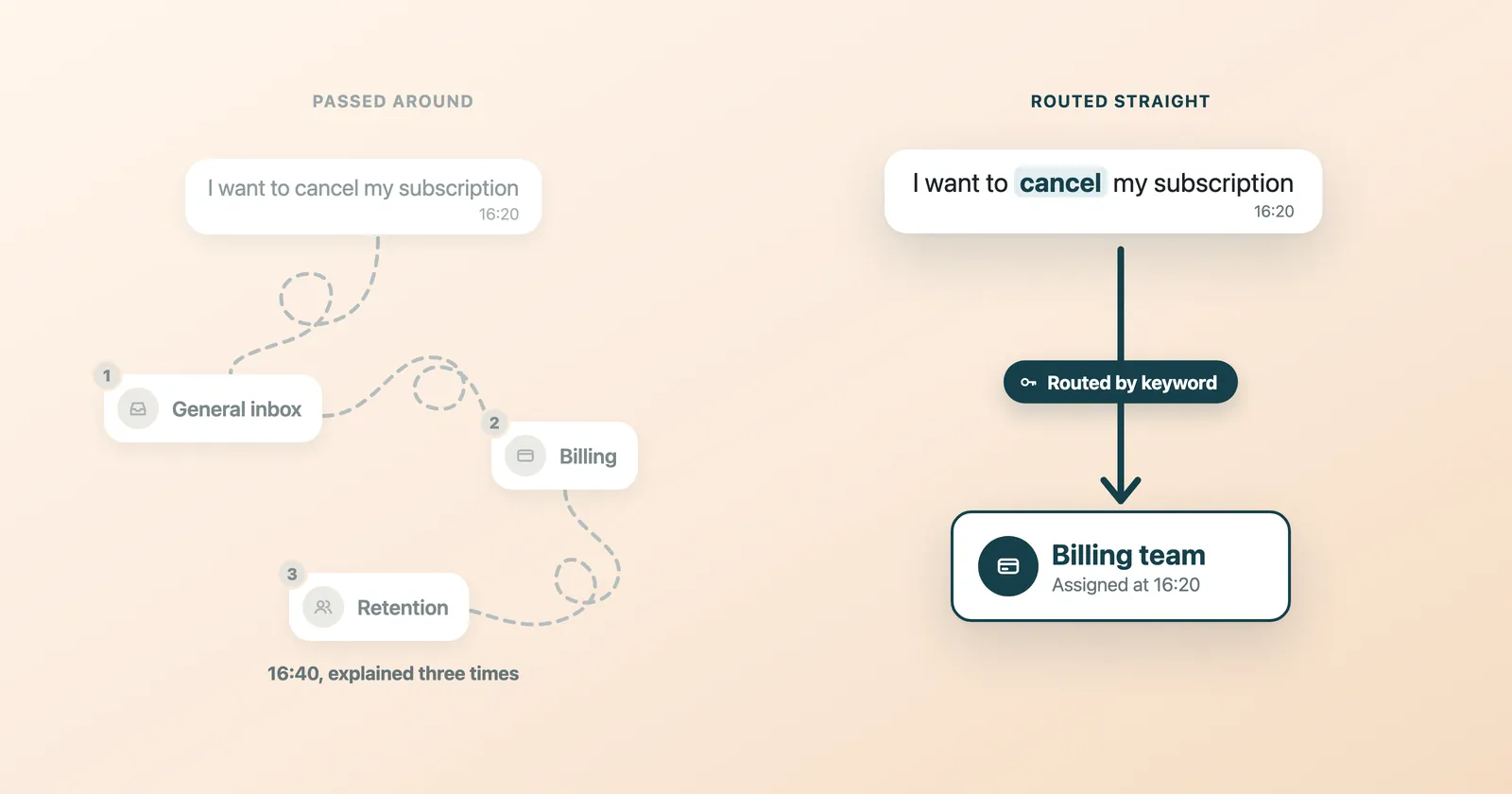
The problem: A customer messages "I want to cancel my subscription." The message lands in a general inbox. A junior agent tries to handle it, escalates to billing, who then redirects to the retention team. The customer has now waited 20 minutes and explained their issue three times.
The automation: Set up keyword detection rules that route conversations to the right department automatically. WhatsTeam's team inbox supports auto-assignment based on keywords, labels, and department rules. Messages containing "cancel," "refund," or "billing" go straight to the billing team. Messages with "broken," "not working," or "defective" go to technical support.
How to set it up in WhatsTeam:
- Create departments in Team Management (Sales, Support, Billing, etc.)
- Assign agents to each department
- Configure auto-assignment rules based on keywords or chatbot output
- Enable round-robin distribution within each department
The result: First-response time drops because messages skip the triage step entirely. Customers talk to the right person from the first message. Agent satisfaction improves because they handle issues matching their expertise.
3. After-Hours Auto-Reply
The problem: 40% of customer messages arrive outside business hours. Without a response, customers either leave or get frustrated waiting until morning. By the time you reply at 9 AM, they've already bought from a competitor.
The automation: Configure an automatic response that triggers outside your business hours. The message acknowledges receipt, shares your working hours, and gives the customer the option to describe their issue so an agent can pick it up first thing in the morning.
Example auto-reply message:
Thanks for reaching out! Our team is available Monday to Friday, 9 AM to 6 PM (EST). We've received your message and will respond within the first hour of our next business day. In the meantime, feel free to share the details of your question so we can prepare a quick answer for you.
How to set it up in WhatsTeam:
- Go to Settings > Business Hours and define your schedule
- Create a template message for out-of-hours replies
- Enable the auto-reply rule for messages received outside working hours
The result: Customers feel acknowledged immediately. Your team starts the morning with organized, pre-described issues instead of a pile of "hello" messages that need follow-up.
Sales Automations
4. Lead Qualification Bot
The problem: Your sales team spends half its day talking to people who aren't ready to buy, can't afford the product, or don't fit your target market. Every unqualified conversation is time stolen from closing actual deals.
The automation: Build a chatbot flow that asks qualifying questions before routing the lead to a salesperson. The bot collects budget range, company size, timeline, and specific needs. Based on the answers, it either routes to sales (qualified), sends educational content (nurturing), or politely disqualifies.
Example chatbot flow:
Bot: "Thanks for your interest! To connect you with the right person, I have a couple of quick questions." Bot: "What's your team size?" Lead: "About 25 people" Bot: "And are you currently using any WhatsApp Business tools?" Lead: "No, we're just using the regular app" Bot: "Great. What's your main goal — customer support, sales, or marketing?" Lead: "Mostly sales follow-ups" Bot: "Perfect. I'm connecting you with our sales team right now. They'll reach out within 5 minutes." → Auto-assigns to Sales department with labels: team-size:25, goal:sales, current-tool:none
The result: Sales reps only talk to leads who match your ideal customer profile. Conversion rates go up because every conversation starts with context already collected.
5. Abandoned Cart Recovery
The problem: Roughly 70% of online shopping carts are abandoned. Customers add products, get distracted, and never come back. Email recovery campaigns get a 10-15% open rate. Most cart recovery emails go unread.
The automation: When a cart is abandoned, trigger a WhatsApp template message through your integration (Shopify, WooCommerce via Zapier/Make). The message reminds the customer what they left behind and includes a direct link back to their cart.
Example message sequence:
- 1 hour after abandonment: "Hey [Name], you left [Product] in your cart. Still interested? Here's your cart: [link]"
- 24 hours later (if no purchase): "Your [Product] is still waiting. Complete your order today and get free shipping."
How to set it up in WhatsTeam:
- Connect your e-commerce platform via Zapier or Make
- Create approved template messages for cart recovery
- Set up the trigger: cart abandoned > wait 1 hour > send template
- Track delivery and click-through in WhatsTeam's campaign analytics
The result: WhatsApp messages see open rates above 90%. Businesses recover 15-25% of abandoned carts with a simple two-message sequence. At scale, this single automation can pay for your entire WhatsApp platform cost.
6. Post-Purchase Upsell
The problem: A customer just bought running shoes. They're in a buying mood. But your team doesn't follow up with complementary products because they're too busy handling new inquiries.
The automation: Trigger a template message 3-5 days after purchase with personalized product recommendations based on what they bought. This isn't about blasting your entire catalog. It's one targeted suggestion with a direct link.
Example template:
Hi [Name]! How are you enjoying your [Product]? Customers who bought [Product] also loved our [Complementary Product]. Check it out here: [link]
How to set it up in WhatsTeam:
- Set up a webhook trigger from your store for completed purchases
- Create a template message with variable fields for product names
- Schedule delivery 3-5 days post-purchase using WhatsTeam's campaign scheduler
- Segment by product category to match recommendations accurately
The result: Post-purchase upsells through WhatsApp convert significantly better than email because the message lands in a channel the customer checks dozens of times daily. Even a 5-8% conversion rate on upsell messages adds meaningful recurring revenue.
Marketing Automations
7. Welcome Series for New Contacts
The problem: A new customer signs up or makes their first purchase. They get a generic confirmation and then silence until your next mass campaign. The window where they're most engaged with your brand closes fast.
The automation: Trigger a 3-message welcome sequence that introduces your brand, delivers value, and encourages a second action (a purchase, a review, a referral).
Example sequence:
- Immediately: "Welcome to [Brand]! Here's what to expect from us on WhatsApp: order updates, exclusive deals, and quick support. Reply STOP anytime to unsubscribe."
- Day 3: "Here's a quick guide to getting the most out of [Product/Service]: [link to guide or tips]"
- Day 7: "As a thank you for joining us, here's 10% off your next order: [code]. Valid for 14 days."
How to set it up in WhatsTeam:
- Create three approved template messages
- Build a campaign with scheduled delivery (Day 0, Day 3, Day 7)
- Set the trigger: new contact added > start welcome sequence
- Include an opt-out keyword (required by WhatsApp policy)
The result: Welcome sequences build a relationship before the customer forgets who you are. The discount in message 3 drives a measurable second purchase. Businesses report 20-30% redemption rates on welcome-series offers sent via WhatsApp.
8. Re-Engagement Campaign for Inactive Customers
The problem: You have hundreds of contacts who bought once and disappeared. They're still opted in to WhatsApp, but you haven't messaged them in 60 days. They're about to become permanently lost revenue.
The automation: Segment your contact list by last activity date. Create a campaign targeting customers who haven't interacted in 30+ days. Send a single re-engagement message with a clear value proposition or offer.
Example message:
Hi [Name], we haven't heard from you in a while! We've added new [products/features] since your last visit. Here's a [discount/free shipping] to welcome you back: [link]
How to set it up in WhatsTeam:
- Filter contacts in your CRM by last message date (30+ days inactive)
- Create a campaign in the campaign builder
- Upload the contact segment and schedule delivery
- Track open rates, replies, and conversions
The result: Re-engagement campaigns typically win back 8-15% of inactive customers. The cost of a single WhatsApp message is a fraction of what you'd spend acquiring a new customer.
9. Event and Webinar Reminders
The problem: Someone registers for your webinar. You send a confirmation email. By the day of the event, they've forgotten. Email reminders have a 22% open rate. No-show rates for online events average 40-50%.
The automation: Send WhatsApp reminders at strategic intervals. Registration confirmation plus a reminder 24 hours before, 1 hour before, and a follow-up after the event.
Example sequence:
- On registration: "You're in! [Event Name] is on [Date] at [Time]. We'll send you a reminder the day before."
- 24 hours before: "Reminder: [Event Name] starts tomorrow at [Time]. Here's your join link: [link]"
- 1 hour before: "Starting in 1 hour! Click to join: [link]"
- After the event: "Thanks for joining [Event Name]! Here's the recording: [link]. What did you think?"
How to set it up in WhatsTeam:
- Connect your registration form to WhatsTeam via Zapier or Make
- Create template messages for each touchpoint
- Schedule the campaign sequence relative to the event date
- Use the post-event message to collect feedback or drive the next action
The result: WhatsApp reminders cut no-show rates significantly because the message actually gets seen. The post-event follow-up captures feedback while the experience is fresh and keeps the conversation going.
Operational Automations
10. Order Status Updates
The problem: Customers ask "Where is my order?" more than any other question. Each status inquiry takes an agent 3-5 minutes to look up and respond. Multiply that by 100 daily orders and your support team is buried.
The automation: Trigger automatic WhatsApp messages at each order milestone. When your system updates the order status, a webhook sends a template message to the customer.
Example sequence:
- Order confirmed: "Your order #[ID] is confirmed! We're preparing it now."
- Shipped: "Your order #[ID] has shipped! Track it here: [tracking link]"
- Out for delivery: "Good news! Your order #[ID] is out for delivery today."
- Delivered: "Your order #[ID] has been delivered. Enjoy! Need help? Just reply to this message."
How to set it up in WhatsTeam:
- Connect your order management system via webhooks (Zapier/Make)
- Create approved template messages for each status milestone
- Map order status changes to the correct template
- Include dynamic variables for order ID, tracking link, and customer name
The result: "Where is my order?" inquiries drop dramatically. Customers feel informed without having to ask. Support agents handle complex issues instead of copying tracking numbers.
11. Appointment Reminders
The problem: No-shows cost service businesses thousands per month. A dentist, consultant, or salon with a 20% no-show rate is losing an entire day's revenue every week. SMS reminders help but have declining open rates.
The automation: Send appointment confirmations and reminders through WhatsApp. A confirmation at booking, a reminder 24 hours before, and an option to reschedule.
Example sequence:
- On booking: "Your appointment with [Business] is confirmed for [Date] at [Time]. Reply CHANGE to reschedule or CANCEL to cancel."
- 24 hours before: "Reminder: your appointment is tomorrow at [Time] with [Staff Name]. Reply CHANGE if you need to reschedule."
- 2 hours before: "See you in 2 hours at [Location]. Need directions? [map link]"
How to set it up in WhatsTeam:
- Integrate your booking system with WhatsTeam via Zapier or Make
- Create template messages with dynamic fields for date, time, and staff
- Set up keyword triggers: CHANGE routes to rescheduling flow, CANCEL confirms cancellation
- Schedule reminders relative to the appointment date
The result: Businesses using WhatsApp appointment reminders report no-show rate reductions of 30-50%. The keyword-based rescheduling also captures cancellations early enough to fill the slot.
12. Review and Feedback Collection
The problem: You need customer reviews to grow. But email review requests get ignored. Asking in person is awkward. And the customers who do leave reviews tend to be the unhappy ones.
The automation: Send a WhatsApp message 24-48 hours after service completion asking for feedback. Start with a simple satisfaction question. If the response is positive, share a direct link to your Google or Trustpilot review page. If negative, route to a support agent to resolve the issue privately before it becomes a public review.
Example flow:
Bot: "Hi [Name]! How was your experience with us? Reply with a number:" Bot: "1 - Excellent" Bot: "2 - Good" Bot: "3 - Could be better" Customer: "1" Bot: "Awesome! We'd love it if you shared your experience. Leave a quick review here: [Google Review link]" --- OR if customer replies "3" --- Bot: "We're sorry to hear that. A team member will reach out to you shortly to make things right." → Auto-assigns to Customer Success team
How to set it up in WhatsTeam:
- Build a chatbot flow with branching logic based on the customer's rating
- For positive ratings: send a template with your review platform link
- For negative ratings: auto-assign to a support agent with context
- Trigger the flow 24-48 hours after service completion via webhook
The result: This creates a positive feedback loop. Happy customers leave public reviews. Unhappy customers get resolved privately. Your public reputation improves while you catch problems before they escalate.
How to Set Up These Automations with WhatsTeam
Every example above can be built on WhatsTeam without writing code. Here's what you need:
The No-Code Chatbot Builder
WhatsTeam's AI chatbot builder lets you create conversation flows visually. Drag nodes, connect them with conditions, and add AI-powered responses using your own knowledge base. The builder supports:
- Keyword triggers and intent detection
- Branching logic based on customer replies
- AI responses powered by OpenAI for natural conversations
- Fallback to human agents when the bot can't resolve an issue
Campaign Scheduler
The campaign tool handles bulk messaging with scheduling, contact segmentation, and delivery analytics. Use it for welcome sequences, re-engagement campaigns, event reminders, and any message that goes to a list of contacts.
Template Message Manager
WhatsApp requires pre-approved templates for outbound messages. WhatsTeam's template manager lets you create, submit for approval, and manage all your templates in one place. Add dynamic variables for personalization.
Team Inbox with Auto-Assignment
The shared inbox brings all conversations into one view. Auto-assignment rules, department routing, labels, and quick replies keep your team organized as volume scales.
Integrations
Connect WhatsTeam to your existing tools through Zapier, Make, or the REST API. This is how you trigger automations from external events like purchases, form submissions, and booking confirmations.
FAQ
How much does WhatsApp automation cost?
WhatsApp charges per conversation (not per message). Pricing varies by country and conversation type. WhatsTeam plans start at $29/month for the platform, plus Meta's conversation fees. See the full breakdown on our pricing page.
Do I need the WhatsApp Business API for automation?
Yes. The free WhatsApp Business app supports basic auto-replies, but anything beyond that (chatbots, campaigns, integrations, multi-agent inbox) requires the API. WhatsTeam provides API access as part of every plan.
Can I send promotional messages on WhatsApp?
Yes, but only to customers who have opted in. WhatsApp requires explicit consent before sending marketing messages. You also need pre-approved message templates for any outbound promotional content.
How long does it take to set up these automations?
Simple automations like auto-replies and after-hours messages take 5-10 minutes. Chatbot flows with branching logic take 30-60 minutes. Full campaign sequences with integrations take a few hours. None of them require coding.
Will these automations work for my industry?
These patterns apply to e-commerce, SaaS, healthcare, education, real estate, hospitality, and professional services. The specific messages change, but the automation logic is the same: trigger, message, action.
Start Automating Today
Every hour your team spends answering "What are your business hours?" is an hour not spent closing a deal, solving a real problem, or building a relationship.
These 12 automations aren't theoretical. They're running right now on thousands of WhatsApp Business accounts. The only question is whether you set them up this week or let another month of manual messaging go by.
Start your 14-day free trial and build your first automation in under 30 minutes. No credit card required.
Or compare plans on our pricing page to find the right fit for your team.